 Agencies and studios
 Photographers
 Podcasters
 Video and social creators
 Marketers and content teams
Download free
macOS and Windows. Your files stay on your computer.
macOS and Windows. Your files stay on your computer.
Nothing is uploaded. No sign-up.
Pull the main colors out of a JPG, PNG, WebP or AVIF and copy their hex codes, right in your browser. For swatch cards, CSS and hundreds at once, Hangar runs on your Mac or PC.
Hangar saves each palette as a swatch card, CSS or JSON, for one image or hundreds.
The file from the run in the recording
How it works
1 Start from
JPG, PNG, WebP, HEIC, TIFF, SVG and camera RAW all work.
2 Set it
Pick 2 to 12. The preview shows the exact colors you will get, largest share first.
3 Export
A PNG swatch card, plus CSS variables, JSON or both, named after each image.
New to Hangar? How to run a tool, step by step
Choose what you get
Colors are ranked by how much of the image they cover. The card and both files list them in the same order, so the first swatch is always the biggest share.
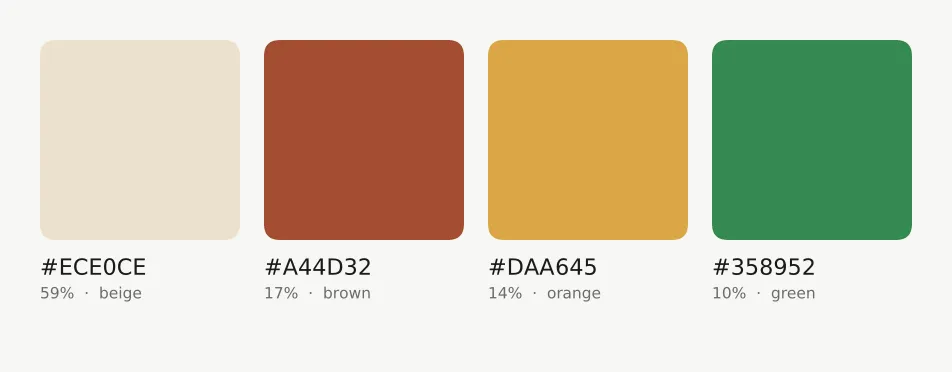
Each color with its hex code, share and a plain name.
Best for moodboards and client decks.
Variables named --color-1, --color-2 and so on.
Best for pasting straight into a stylesheet.
Hex, RGB, coverage and a basic color name for every swatch.
Best for your own scripts and design tokens.
Every setting, explained in the Color palette guide Colors · Swatch card · Data exports
Who uses it
Pull five to eight colors from each reference photo and compare them side by side.
Turn a hero image or a client logo into variables you can paste into a stylesheet.
Read the palette of a frame without exporting it first, for a print or a gallery theme.
Hangar for photographersOne app, one payment
The same app converts, compresses, resizes and cleans up photos, and does the same kind of work for PDFs, video and audio. One payment covers every tool.
A typical routine
Crop down to the product so the backdrop does not take over, pull its palette, then build a matching backdrop in Gradients.
The alternative
Palette sites are free and let you nudge colors by hand. They work one image at a time, and they live in a browser tab.
Every tool is free for 3 days, with no account and no card. After that, Hangar is a one-time payment from $45, with updates for the version you buy. There is no subscription.
Yes. The same image with the same number of colors always gives the same palette.
No. See-through pixels are skipped, so a logo on transparency gives the colors of the logo only.
No. You get a PNG card, CSS and JSON. Copy any hex code from the card into your design app.
Anywhere from 2 to 12. If an image has fewer distinct colors than you ask for, it returns the ones that are really there.
Yes. Read any hex code off the card, use the CSS variables on the web, or load the JSON into your own tools.
Yes. The swatch card lists each color with its hex value and how much of the image it covers.
No. Your files are processed on your computer and never sent anywhere. Hangar sends anonymous usage counts to improve the app, never file names or contents, and you can turn that off in Settings.
Yes. A license works on any mix of Mac and Windows computers. Solo covers 1 computer, Crew 3 and Fleet 10.
Then pay once, from $45, for every tool and the updates for your version. No subscription. 30-day refund.See plans
Intel Mac or need help installing? All downloads
Hangar runs on Mac and Windows. Open this page there to download.