 Agencies and studios
 Photographers
 Podcasters
 Video and social creators
 Marketers and content teams
Can I use Hangar offline?
Yes. Hangar checks the license now and then in the background, and between checks it works with no connection at all. After 3 days without a check, the sidebar shows License check due with Connect to the internet within the days you have left.
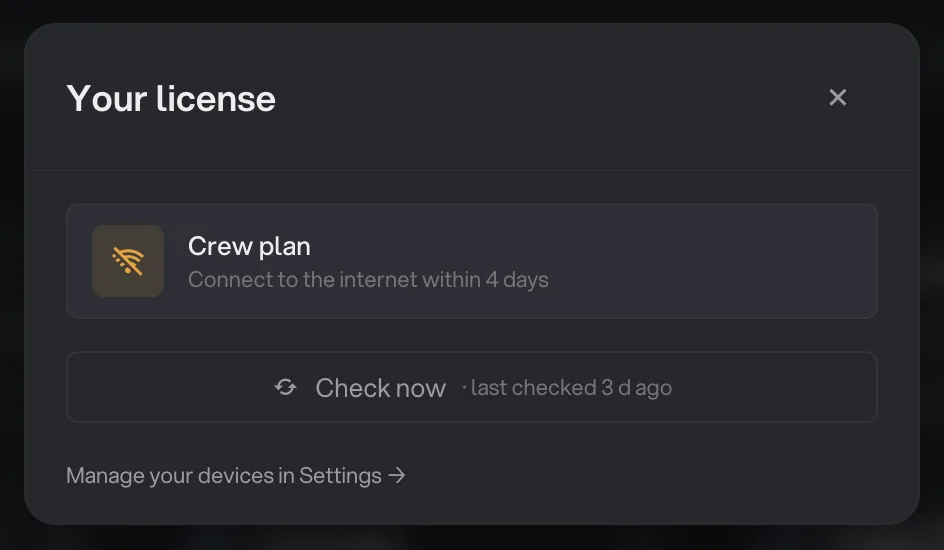
- Days left to reconnect
- Check now
Connect at least once every 7 days. Once online, click the card and then Check now, or just keep working and Hangar checks on its own.
License check needed
If the 7 days run out, the card reads License check needed with Check now to keep working, and tool and chain runs pause. Connect, click the card and click Check now; runs start again straight away.
License messages and what to do
These are the messages you may meet in the activation window, the sidebar card or Settings → License.
| Message | What to do |
|---|---|
| That key wasn't recognized. | Paste the key from your purchase email instead of typing it. Keys start with HNGR. Lost it? Find your key. |
| Waiting for the license owner | Every seat is taken. Approve the computer from the email, or move the license from this one. |
| That approval request expired. | Requests last 30 minutes. Enter the key again to send a new one. |
| The license owner declined this computer. | Ask the person who bought the license before requesting again. |
| All device slots are in use. | Free a seat in Settings → License or on hangar.tools/licenses, then activate again. |
| The device-switch limit has been reached. | Settings → License shows when the next switch is available. Active computers keep working. |
| License check due / License check needed | Connect to the internet and click Check now. |
| License deactivated | This computer was removed from the license. Enter the key again to activate it, which takes a seat. |
| License is for another device | The license on this computer was activated elsewhere, for example after restoring a backup onto a new machine. Activate it on this one. |
| This license is no longer active. | The license was refunded or cancelled. Contact support if that is unexpected. |
| Couldn't reach the licensing server. | Check your connection and try again. Hangar keeps working offline in the meantime. |
Still not working?
The Need help with a license? link at the bottom of Settings → License opens a support message about your license, ready to write. You can also reach support on the website.
If a run fails for a reason that has nothing to do with the license, such as a locked PDF or a full disk, see a file failed: what to check.
Common questions
Does Hangar need the internet to work?
No. Your tools run entirely on your computer. Hangar only needs a connection now and then to check the license, at least once every 7 days.
Will I lose my work if the license locks?
No. A locked license only stops new tool and chain runs. Workspaces, chains, run history and every exported file stay where they are, and runs start again as soon as the license is fixed.
Why does a run refuse to start?
An ended trial or a license check that is overdue blocks runs. Open the card at the bottom of the sidebar to see which, or read the file failed guide for causes unrelated to the license.
Still stuck?
One person reads every message, usually with a reply within a day.