 Agencies and studios
 Photographers
 Podcasters
 Video and social creators
 Marketers and content teams

To find and replace text in many file names, add a Find and replace in Hangar’s Batch rename, read every new name, and stack more replacements in the same pass. Finder’s Replace Text handles one replacement and shows one example name. File Explorer can’t do it at all.
We tested this with Hangar 0.12.2 and 0.12.3 and Finder on macOS 27.0.1, on 180 camera files, 30 worksheets and 40 small files built to go wrong.
Find and replace file names in Hangar
- Open Batch Rename and click Folder, or Files to pick them by hand.
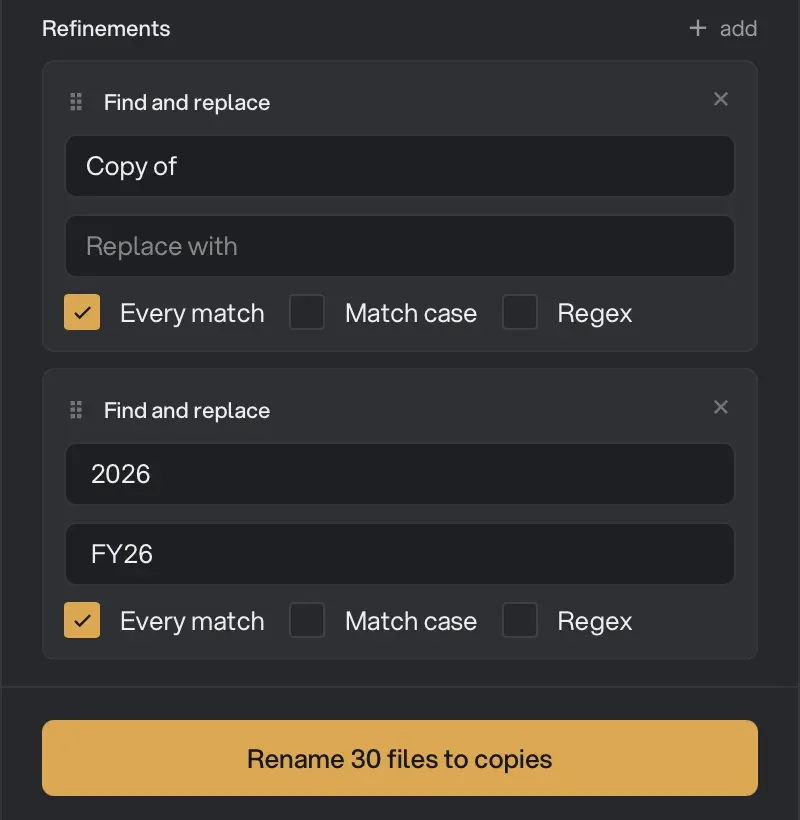
- Click add next to Refinements and pick Find and replace. Enter the first find and replace.
- Add another Find and replace for each further change. They run from top to bottom, each on the result of the one above, and the arrows on a card move it up or down.
- Read down the queue. Each file shows its final name under the old one.
- Leave Save copies selected and click Rename 30 files to copies (the button shows your own file count).
On our 30 worksheets, “Copy of “ to nothing and “ 2026” to “ FY26“ turned Copy of Assets 2026.xlsx into Assets FY26.xlsx, and the same for the other 29:
Four jobs and how to set each one up
| Job | Find | Replace with | Result |
|---|---|---|---|
| Swap a prefix | IMG_ |
Lisbon_ |
IMG_4121.JPG → Lisbon_4121.JPG |
| Delete a word | Copy of |
nothing | Copy of Assets 2026.xlsx → Assets 2026.xlsx |
| Change part of a name | 2026 |
FY26 |
Assets 2026.xlsx → Assets FY26.xlsx |
| Change a client name | AcmeCo |
Northwind |
AcmeCo proposal.txt → Northwind proposal.txt |
Watch the space in “Copy of “ and “ 2026”. It’s part of what you’re finding, and leaving it out leaves a stray space in every name.
The two traps
Both come from the same thing: the find looks for letters, not meaning.
Case. Find and replace ignores case, which suits most client renames. To leave “acmeco” alone, tick Match case. On a small test folder with two files spelled AcmeCo, one acmeco and one ACMECO, it changed only the two AcmeCo files. With the box off, it changed all four.
Partial matches. “Jo” is also inside Joanna, Jordan, Major and Project Jobs. Replacing Jo with Sam changed 10 of our 20 files:

Tick Regex and use \bJo\b, where \b means “the edge of a word”. That changed only the 3 files that had Jo as its own word:

When to use a regular expression
A regular expression, or regex, describes a pattern of text instead of exact letters. Three are worth copying. Tick Regex on the Find and replace card.
| What you want | Find | Replace with | Our result |
|---|---|---|---|
| Remove anything in brackets | \s*\([^)]*\) |
nothing | Deck (copy).txt → Deck.txt |
| Move a date from the end to the start | ^(.*) (\d{4}-\d{2}-\d{2})$ |
$2 $1 |
Report 2024-03-15.txt → 2024-03-15 Report.txt |
| Remove every number | \s*\d+ |
nothing | Plan 7 draft.txt → Plan draft.txt |
In the second one, each pair of brackets captures a piece of the name, and $1 and $2 put those pieces back in the order you choose. All 7 dated files moved cleanly:

The other two need care. Removing brackets from Scan (1) page.txt and Scan (2) page.txt gave both the same name, so Hangar flagged 2 name clashes. Removing every number gave 12 clashes, and Report 2024-03-15.txt came out as Report–.txt.
Find and replace with Finder
Select the files, choose File > Rename and pick Replace Text. Fill in Find and Replace with, check the example at the bottom, and click Rename. Apple’s guide shows the same steps.
You get one replacement per pass and no whole-word option. It also ignores case, so our AcmeCo search hit 8 files, including “acmeco brief” and “ACMECO contract”. If it goes wrong, press Cmd+Z straight after, and see undoing a batch rename if you can’t.
Find and replace on Windows
File Explorer has no find and replace for names. Hangar also runs on Windows, though we ran the steps above on a Mac. PowerRename in Microsoft’s free PowerToys is the other route. We didn’t run it.
Short questions
Does find and replace change the file extension?
Not in Hangar. The extension is kept even when the find matches letters inside it. To change it, add Change extension. In Finder, check the example before you click Rename.
Can I replace text in the contents of files this way?
No. These tools change file names only.
Why did nothing change in the preview?
The find has to match exactly, spaces included. With Regex ticked, characters like brackets and dots have special meaning, so untick it for plain text.
For the wider picture, read how to rename multiple files at once. If the text you’re replacing is spaces, removing spaces from file names has a better route. Hangar’s other file tools are in the archive group.
Find and replace across a whole folder offline, with every new name shown first.