 Agencies and studios
 Photographers
 Podcasters
 Video and social creators
 Marketers and content teams
Hide your full account and card numbers, plus any payments that are nobody’s business. Leave your name, the statement dates and your income visible, because those are what a landlord or lender is checking. Use a redaction tool that deletes the text, not a black box drawn on top, then check the copy before you send it.
We tested this on a made-up 3-page bank statement, then six months of them, in Hangar 0.12.1 on macOS.
What should you black out on a bank statement?
The rule is simple: hide what could be used to take money from you, and what’s private but irrelevant. Keep what proves the thing you were asked to prove.
| On the statement | Landlord or letting agent | Mortgage lender | Proof of address |
|---|---|---|---|
| Full account number | Hide | Ask first | Hide |
| Sort code or routing number | Hide | Ask first | Hide |
| Card numbers in transaction lines | Hide | Hide | Hide |
| Your name and address | Keep | Keep | Keep |
| Statement dates | Keep | Keep | Keep |
| Salary and other income | Keep | Keep | Hide if you like |
| Rent or mortgage payments | Keep | Keep | Hide if you like |
| Everyday spending | Hide if you like | Ask first | Hide if you like |
| Payments that reveal health, religion or politics | Hide | Ask first | Hide |
| Balance | Keep | Keep | Hide if you like |
Citizens Advice tells renters who are asked for bank statements to cover over the account numbers for security. That’s the minimum. A payment to a clinic, a church or a political party is private too, and a landlord has no need to see it.
Will a landlord or lender accept a redacted statement?
Usually yes for a landlord, and often no for a mortgage lender. A landlord wants to see that your income covers the rent. Hiding account numbers and unrelated spending doesn’t get in the way of that.
A mortgage lender checks your outgoings against what you declared, and may want every page and every transaction. In the US, Fannie Mae’s Selling Guide, which sets the paperwork for most conventional mortgages, says a statement must show at least the last four digits of the account number and every deposit and withdrawal. So masking all but the last four digits is fine, and hiding transactions isn’t. UK lenders don’t publish one rule, but a lender’s director told brokers that statements missing the full account number and sort code lead to requests for more information. Ask your broker or lender before you redact anything, and ask in writing.
If they say no, you have two fair options:
- Send the full statement through the lender’s own secure upload instead of by email.
- If what they need is proof that the account is yours, ask your bank for an account confirmation letter. Monzo and Starling let you download one in their app. It shows your name, address and account details, but no transactions.
Don’t hide so much that the page looks edited. A statement that’s mostly black bars can get rejected as suspicious.
Why a black box isn’t enough
A rectangle drawn in a PDF editor sits on top of the text. The number is still in the file, and anyone can copy and paste it out. We showed this happening in our guide on how to redact a PDF so the text is really gone, and the same is true of a bank statement.
Statements make it worse in one way. Your account number is printed in more places than you think.
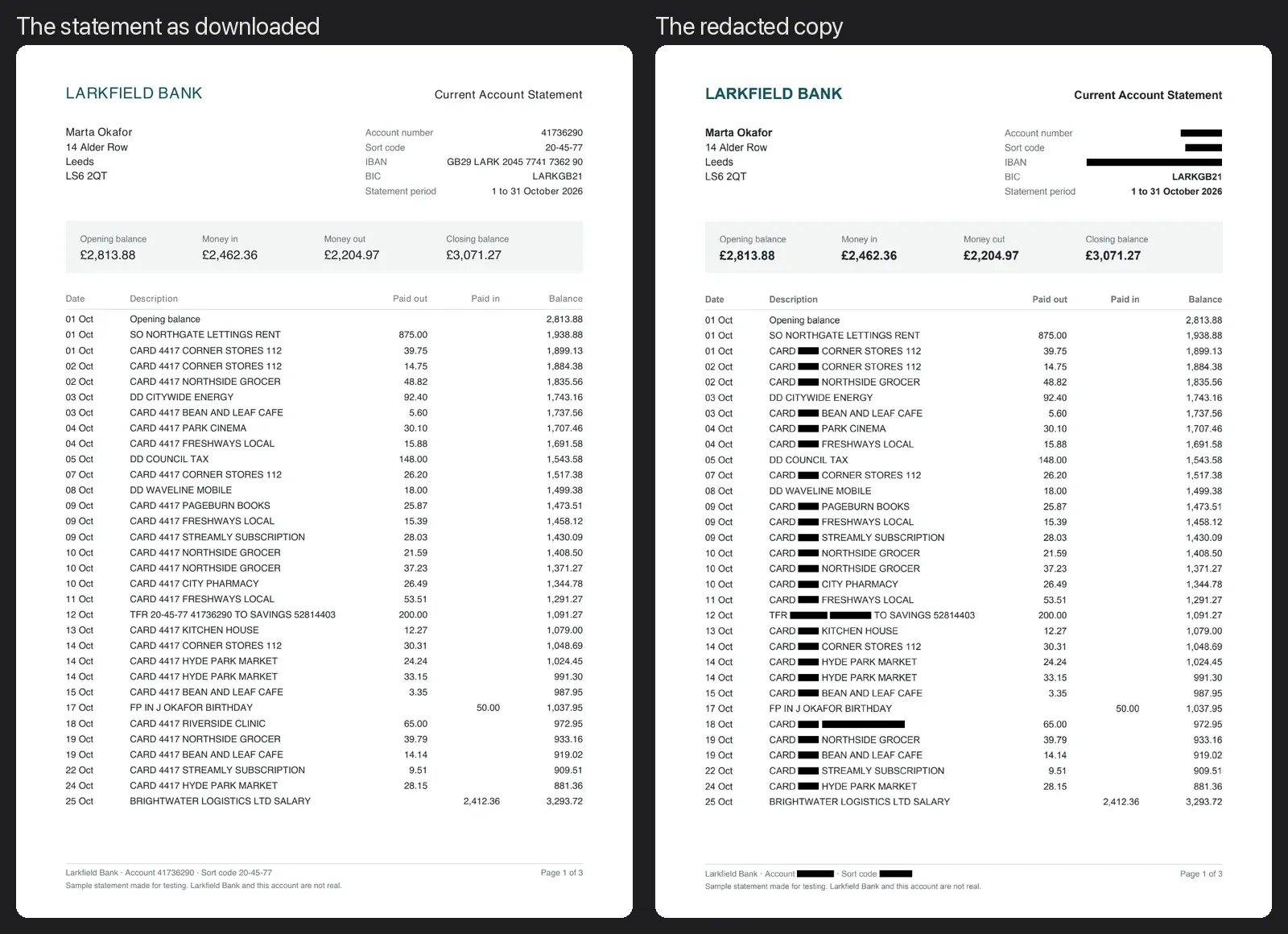
On our sample, the account number appeared 6 times across 3 pages: in the header, in a transfer to savings, in the footer of every page, and in the notes on the last page, where the bank asks you to quote it. Boxing them by hand means finding every one. A search term finds them for you.
It’s also hidden in the IBAN, split up by spaces: “GB29 LARK 2045 7741 7362 90”. A search for “41736290” doesn’t find it there, and neither does one for the sort code. If your statement shows an IBAN, add it as a term of its own, exactly as printed.
How to redact your bank statement
Download the statement as a PDF from your online banking, not a photo or scan. A downloaded statement has real text, so Hangar can search it.
- Open Redact in Hangar and add the statement.
- Under Search terms, type your account number exactly as it’s printed and click Add. If the bank prints it in two formats (with and without spaces), add both.
- Add your sort code or routing number, your IBAN if the statement shows one, the last four digits of each card that appears in transactions, and the name of any payee you want gone.
- Leave Whole values only on, so a short number like the card digits doesn’t get cut out of a longer number.
- Leave Strip document metadata on. Some banks put your name or account in the file’s properties.
- For anything you can’t type exactly, like a logo or a handwritten note, click Draw areas manually to open the Redact Studio and draw a box.
- Click Run redact. Hangar saves a redacted copy and leaves your original as it was.
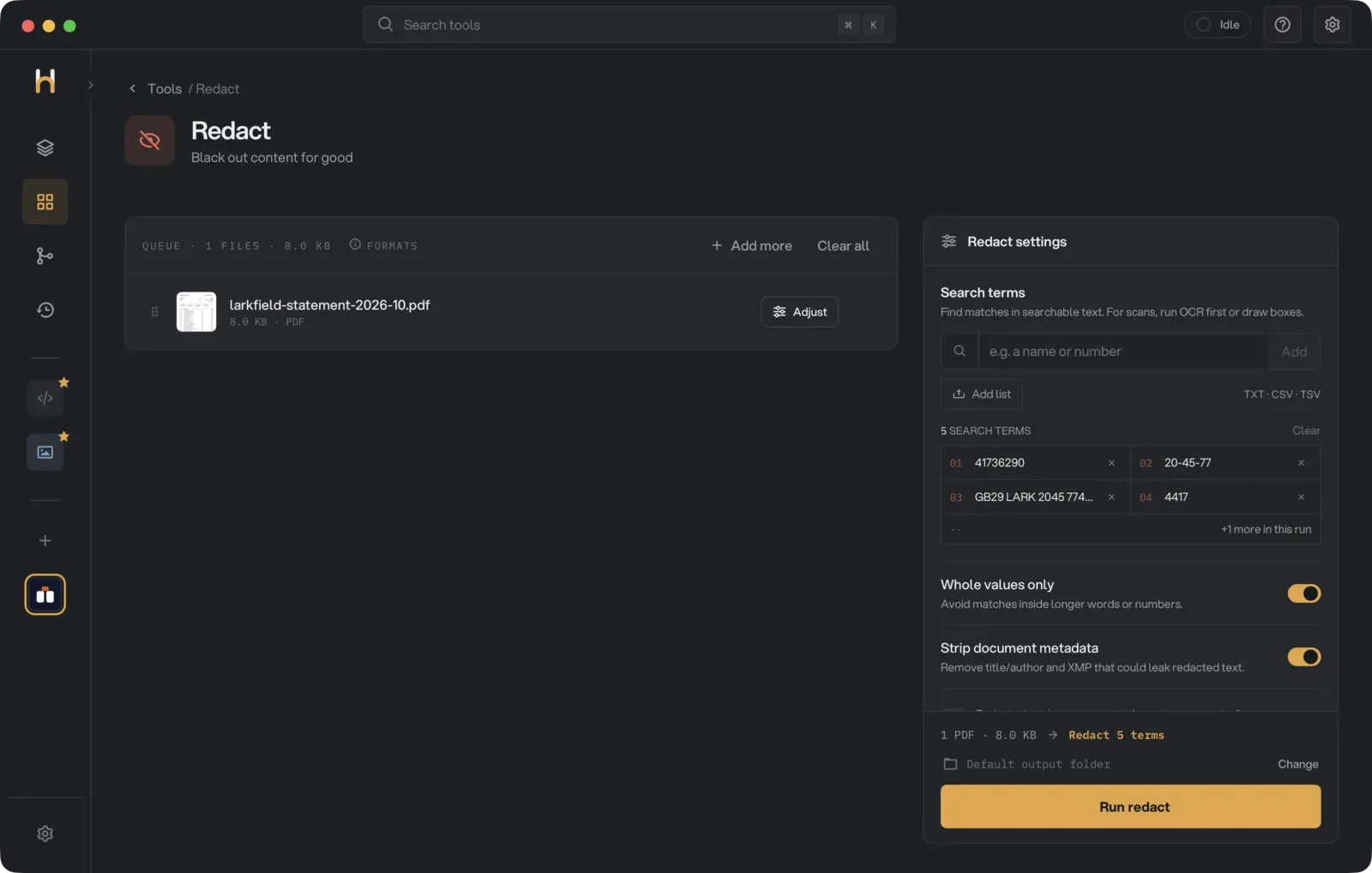
On our sample, Redact saved larkfield-statement-2026-10-redacted.pdf and left the original alone. All 6 account numbers, 6 sort codes, the IBAN, the 31 card numbers and the clinic were blacked out. The name, the salary and every balance stayed readable, and the title and subject fields, which held the name and account number, came out empty.
One thing you’ll notice: Hangar says “Complex pages become images and lose selectable text”, and a statement counts as complex. Hangar only edits the text in place on simple pages, and the table lines and shading on a statement rule that out. So all three pages of our copy came out as images. The numbers are gone for good, but you can’t select or search the copy’s text, and the file grew from 8 KB to 545 KB.
If you hide a payee, check the whole transaction line. Hiding “Riverside Clinic” removes the name, but the amount and the date stay. That’s usually what you want, because the totals still add up.
The statement never leaves your computer while you do this. For a document that holds your account number, that’s the point.
Redacting several months at once
Landlords often ask for three months and lenders for six. You don’t need to do each one separately.
Add all the statements to Redact at once. The search terms apply to every PDF in the queue, so you type your account number once and it’s removed from all of them.
We then ran six made-up statements, May to October, in one go with the same five terms. We read every page of the six copies back with OCR, and none of the numbers or the clinic came back.
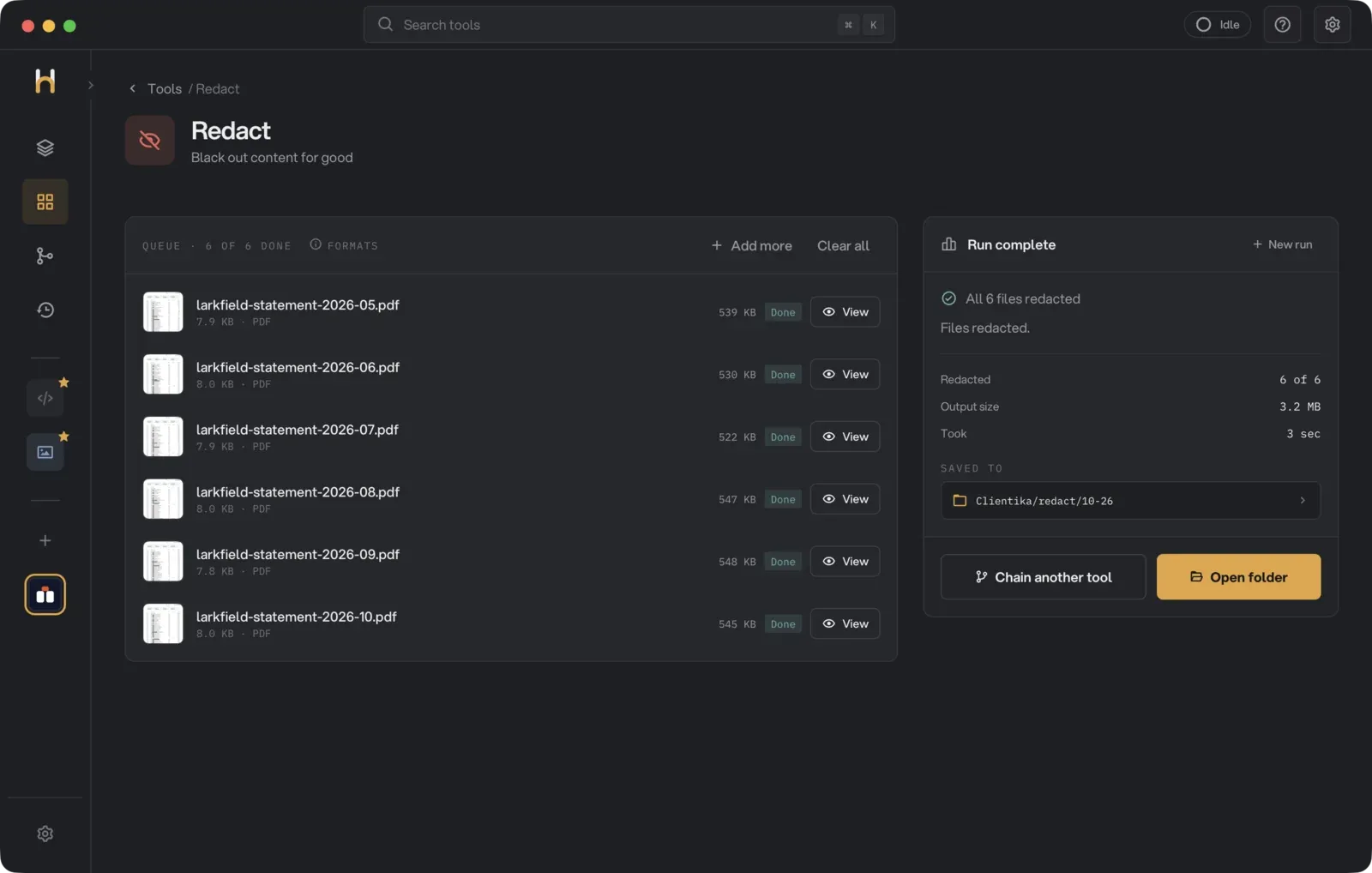
Six statements can add up to a big attachment. Ours went from 48 KB to 3.2 MB, because the pages became images. If it’s too large to email, our guide on making a PDF small enough to email shows the fix.
Check it before you hit send
Open each redacted copy and:
- Look at every page. Each account number, sort code and card number should sit under a black bar, and your name and income lines should still be readable. If they aren’t, you’ve hidden too much.
- Search (Cmd+F on a Mac, Ctrl+F on Windows) for your account number, your sort code, your IBAN and each card’s digits. Every search should come back empty. If the pages became images, as ours did, an empty search proves nothing, because there’s no text to search. Run the copy through OCR PDF first, then search the OCR’d copy.
- Check the file’s properties (File > Properties, or Tools > Show Inspector in Preview). There should be no name or account number there.
Other ways to do it
- Ask the bank. If the recipient only needs proof that the account is yours, an account confirmation letter does that and shows no transactions.
- Adobe Acrobat Pro has a real Redact tool on a paid plan. Acrobat Reader’s drawing and cross-out tools don’t remove anything.
- Preview on a Mac: a drawn rectangle doesn’t redact. If you use Preview’s redaction tool, run the search check above on the result.
- Online redaction sites work, but you upload the statement to them first. We wrote about when uploading a document is fine and when it isn’t. A bank statement is the clearest case for keeping a file on your computer.
- Print, black marker, scan: it works if the marker is solid, but what you send is a scan, not the PDF your bank issued, and a recipient checking the document may ask for the original.
Quick answers
Can a redacted bank statement be un-redacted?
Not if the text was deleted. A black box drawn on top comes off in seconds, which is why the check matters. If the pages became images, there’s no text under the bars to recover. If they kept their text, search for each number: no result means it isn’t in the file.
Should I hide the last four digits of my account?
Card numbers in transaction lines are often shortened to the last four digits already. Hiding them costs nothing, so we did. For the account number itself, hide all of it unless the recipient asks for the last few digits to match the account.
Is it legal to redact a bank statement?
Hiding your account number for security is normal and expected. Hiding transactions to mislead a lender is not. If a lender asks for the full statement, give them the full statement through a secure channel.
Redact your bank statement on your own computer with Hangar.